

Create Your First Project
Generate a configured project in under 5 minutes.
Project Creator
The Reflex Project Creator generates properly configured projects for all supported platforms.
Launch Project Creator
Windows:
/reflex/bin/tools/win/ReflexProjectCreator.exemacOS:
/reflex/bin/tools/macos/ReflexProjectCreator.dmgProject Templates
| Template | Description | Use When |
|---|---|---|
| Empty VM App | Live-edit UI application | Learning, prototyping, UI-focused apps |
| C++ App | Full native C++ application | Production apps, complex logic |
| C++ Audio App/Plugin | Audio plugin (VST3/AU/AAX) | Music software, audio tools |
| C++ Console App | Command-line application | Tools, utilities, no UI needed |
Create a Project
1
Launch ReflexProjectCreator
2
Select template: Choose "Empty VM App" or "C++ App"
3
Enter Vendor Name: Your company or personal name (e.g., "MyCompany")
4
Enter Project Name: Your application name (e.g., "HelloReflex")
5
Click Create and choose a location for your project
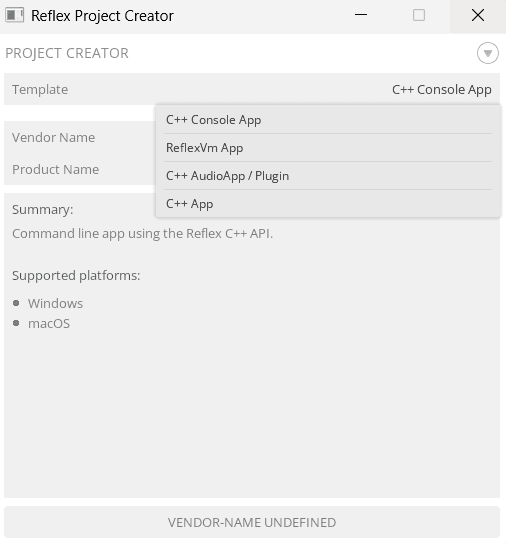
Choose your project template in the Project Creator
Generated Project Structure
The creator generates this structure:
HelloReflex/
├── code/
│   ├── app.h              # App interface (C++)
│   ├── app.cpp            # App implementation (C++)
│   ├── view.h             # View interface (C++)
│   ├── view.cpp           # View implementation (C++)
│   ├── entry.cpp          # Application entry point
│   ├── interface.h        # VM ↔ C++ bridge
│   ├── main.c             # VM state management
│   ├── view.c             # VM UI definition
│   ├── resources.h        # Generated resource header
│   └── resources.cpp      # Generated resource data
├── resources/
│   ├── styles.txt         # Visual styling
│   └── fonts/             # Font files
├── project/
│   ├── win/               # Visual Studio solution
│   ├── macos/             # Xcode project
│   ├── ios/               # iOS Xcode project
│   └── android/           # Android Studio project
├── resources.xml          # Resource manifest
└── info.txt               # Project metadata
Key directories:
code/— All source code (shared across platforms)resources/— Assets (styles, fonts, images)project/— Platform-specific IDE projects
Need offline documentation?
The Reflex Documentation app includes full API reference and examples.
Windows:
/reflex/bin/tools/win/ReflexDocumentation.exemacOS:
/reflex/bin/tools/macos/ReflexDocumentation.dmgProject created? Choose your path
Build your first app. Choose based on your project template: